Kodi is a free and open-source media player software application that allows users to access and stream a wide range of media content, including music, videos, and photos. One of the most powerful features of Kodi is its ability to interface with external services and applications, allowing users to access even more content.
API keys are an essential tool for any Kodi user who wants to interface with external services, as they allow the user to access restricted content and functionality. In this article, we will explore the prerequisites for setting up an API key on Kodi.
Understanding APIs
Before we dive into the specifics of setting up an API key on Kodi, it’s essential to have a basic understanding of what APIs are and how they work. An API, or application programming interface, is a set of protocols and tools used to build software applications. APIs allow applications to communicate with each other, share data, and access features and services that they wouldn’t be able to otherwise.
APIs are essential for any application that relies on external services or data sources, such as Kodi. Kodi uses APIs to interface with a wide range of services, including streaming services like Netflix, Hulu, and Amazon Prime Video, music services like Spotify and Pandora, and social media platforms like Facebook and Twitter.
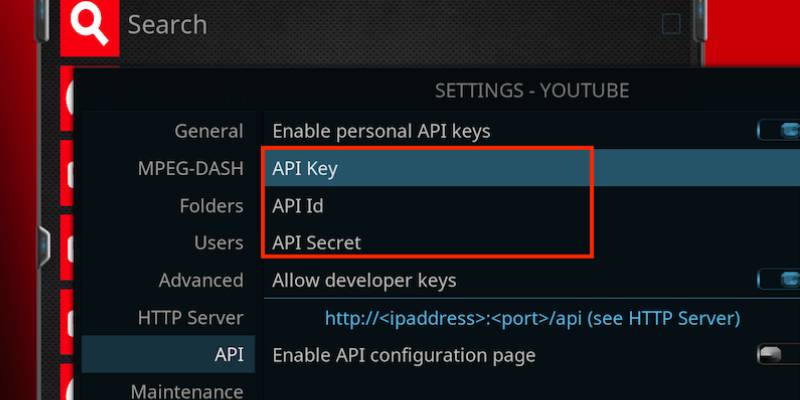
One example of setting up a personal API key on Kodi is YouTube. By setting up a personal API key for YouTube on Kodi, users can access additional features and content on the platform, such as their subscription feed and personalized recommendations. The process for setting up a personal API key for YouTube on Kodi follows the same prerequisites as outlined in the article. However, it’s important to note that each service may have its own API key requirements and guidelines, so it’s crucial to read the documentation carefully before proceeding with the setup.
Understanding the Role of API Keys
API keys are a critical component of API security. They are unique identifiers that are associated with a particular application or user and are used to authenticate API requests. API keys help to ensure that only authorized applications and users can access the API, preventing unauthorized access and misuse.
API keys are typically provided by the service provider, and they are required for any application or service that wants to interface with that API. Kodi users must obtain API keys for any external service that they want to use with Kodi, including streaming services, music services, and social media platforms.
Prerequisites for Setting Up API Keys on Kodi
Now that we have a basic understanding of APIs and API keys, let’s take a look at the prerequisites for setting up API keys on Kodi.
- Identify the Service Provider
The first step in setting up an API key on Kodi is to identify the service provider. Kodi interfaces with a wide range of external services, and each service may have its own API and API key requirements. It’s essential to identify the service provider before attempting to obtain an API key.
- Create an Account
Most service providers require users to create an account before they can obtain an API key. Users must provide some basic information, such as their name, email address, and password, to create an account.
- Locate the API Key
Once the user has created an account, they can locate the API key. The location of the API key will vary depending on the service provider, but it is typically found in the account settings or developer portal.
- Enter the API Key into Kodi
Once the user has obtained the API key, they must enter it into Kodi. To do this, they must navigate to the settings menu in Kodi and locate the interface settings. From there, they can select the service they want to use and enter the API key.
Conclusion
API keys are an essential tool for any Kodi user who wants to interface with external services and applications. By following these prerequisites for setting up an API key on Kodi, users can access a wide range of content and functionality, including streaming services, music services, and social media platforms. With the right API keys, Kodi users can customize their media experience and access the content they want, when they want it.
 Your Talk