The Ultimate Guide to Mastering Internet Marketing Strategies

In today’s digital age, the world of marketing has transformed into an entirely new playing field. The traditional methods of marketing such as print and television ads have taken a backseat to the new age of Internet marketing. With the advent of the internet, businesses can reach out to their target audience with greater efficiency and less expense.

Internet marketing, also known as online marketing, digital marketing, or web marketing, refers to promoting and selling products or services through various online channels, such as search engines, social media platforms, email marketing, content marketing, and mobile apps. It is all about leveraging the power of digital platforms to connect with potential customers and increase brand awareness.

Here are some essential strategies for mastering Internet marketing:

  1. Create a Strong Online Presence

The first step towards mastering internet marketing is to build a strong online presence. This includes creating a well-designed website that showcases your brand and products/services. Your website should be user-friendly, easy to navigate, and optimized for search engines. It should also have a blog section where you can regularly post informative content related to your industry. Additionally, you can also create social media profiles on platforms like Facebook, Twitter, and LinkedIn, and use them to engage with your target audience.

  1. Implement Search Engine Optimization (SEO)

Search engine optimization (SEO) is the process of optimizing your website’s content and structure to rank higher in search engine results pages (SERPs). SEO involves a variety of techniques such as keyword research, on-page optimization, link building, and content marketing. By implementing SEO strategies, you can improve your website’s visibility in search engines, drive more traffic to your site, and generate more leads and sales.

  1. Leverage the Power of Social Media

Social media platforms like Facebook, Instagram, Twitter, and LinkedIn offer immense potential for businesses to reach out to their target audience. With social media marketing, you can create engaging content that resonates with your audience, run targeted ads to reach a specific demographic and engage with your customers through comments and messages. Social media marketing can help you build brand awareness, increase website traffic, and generate more leads and sales.

  1. Use Email Marketing

Email marketing is a highly effective way to connect with your audience and build long-term relationships with your customers. With email marketing, you can send personalized messages to your subscribers, share valuable content, promote your products and services, and generate more leads and sales. The key to successful email marketing is to build a quality email list, segment your subscribers based on their interests and preferences, and send relevant and engaging content.

  1. Invest in Content Marketing

Content marketing involves creating valuable and informative content that resonates with your target audience. This can include blog posts, infographics, videos, and podcasts. By providing valuable content, you can establish yourself as a thought leader in your industry, build trust with your audience, and drive more traffic to your website. Content marketing can help you increase brand awareness, generate more leads, and boost customer loyalty.

Wrap Up

Mastering Internet marketing is essential for businesses looking to grow and succeed in today’s digital age. By creating a strong online presence, implementing SEO strategies, leveraging social media, using email marketing, and investing in content marketing, you can connect with your target audience and increase brand awareness, drive more traffic to your website, and generate more leads and sales. With the right strategies and techniques, you can take your business to the next level and stay ahead of the competition.
Sportowa TV: The Ultimate Kodi Sports Addon for Thrilling Action and Unmatched Performance

Sportowa TV is one of the best Kodi sports add-ons available, offering users access to a wide range of sports content from around the world. Whether you’re a fan of football, basketball, hockey, or any other sport, Sportowa TV has got you covered.

In this article, we’ll take a closer look at Sportowa TV and explore its features, benefits, and how to install it on your Kodi device.

Features of Sportowa TV

Sportowa TV offers a wide range of features that make it one of the best Kodi sports add-ons. Here are some of the most notable features of Sportowa TV:

  1. Multiple sources: Sportowa TV provides access to multiple sources for each event, ensuring that you always have a reliable stream to watch your favorite sports.
  2. Wide range of sports: Sportowa TV covers a wide range of sports, including football, basketball, hockey, tennis, and more.
  3. Live and on-demand content: Sportowa TV provides both live and on-demand content, so you can watch your favorite games live or catch up on games you missed.
  4. High-quality streams: Sportowa TV provides high-quality streams, so you can watch your favorite games in high definition without buffering or lag.
  5. User-friendly interface: Sportowa TV has a user-friendly interface that makes it easy to find the sports content you’re looking for.

Benefits of Sportowa TV

There are many benefits to using Sportowa TV as your go-to Kodi sports add-on. Here are some of the most notable benefits of Sportowa TV:

  1. Free access to sports content: Sportowa TV is a free add-on, which means you don’t have to pay for access to sports content.
  2. No buffering or lag: Sportowa TV provides high-quality streams, which means you don’t have to deal with buffering or lag while watching your favorite games.
  3. Access to multiple sources: Sportowa TV provides access to multiple sources for each event, ensuring that you always have a reliable stream to watch your favorite sports.
  4. Wide range of sports: Sportowa TV covers a wide range of sports, so you can watch your favorite games no matter what sport you’re a fan of.
  5. User-friendly interface: Sportowa TV has a user-friendly interface that makes it easy to find the sports content you’re looking for.

How to install Sportowa TV on Kodi

Installing Sportowa TV on Kodi is a straightforward process. Here’s how to do it:

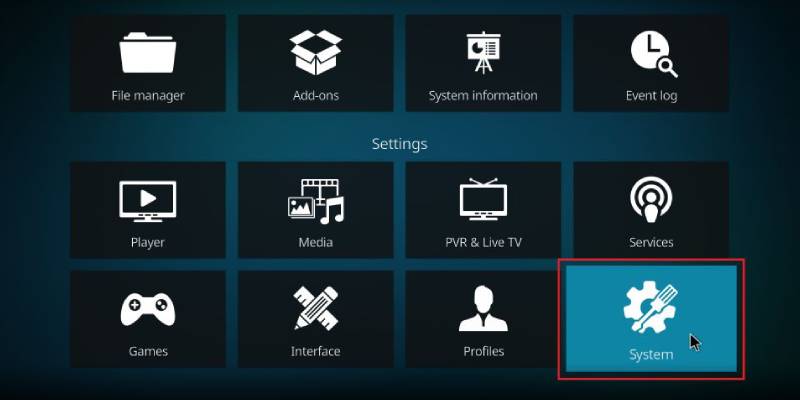
  1. Open Kodi and click on the gear icon in the top-left corner to open the Settings menu.
  2. Click on System, then Add-ons.
  3. Turn on Unknown sources. This will allow you to install add-ons from third-party sources.
  4. Go back to the Add-ons menu and click on the box icon in the top-left corner to open the Add-on browser.
  5. Click on Install from repository.
  6. Click on the Kodi Add-on repository.
  7. Click on Video add-ons.
  8. Scroll down and click on Sportowa TV.
  9. Click on Install and wait for the add-on to download and install.
  10. Once the installation is complete, you can access Sportowa TV from the Add-ons menu.

Wrap Up

Sportowa TV is one of the best Kodi sports add-ons available, offering users access to a wide range of sports content from around the world. Whether you’re a fan of football, basketball, hockey, or any other sport, Sportowa TV has got you covered. With its user-friendly interface, high-quality streams, and access to multiple sources for each event, Sportowa TV is the perfect addition to any Kodi setup. So why wait? Install Sportowa TV today and start watching your favorite sports in high definition without buffering or lag.

What is Drama Cool Kodi Addon and how to Install it?

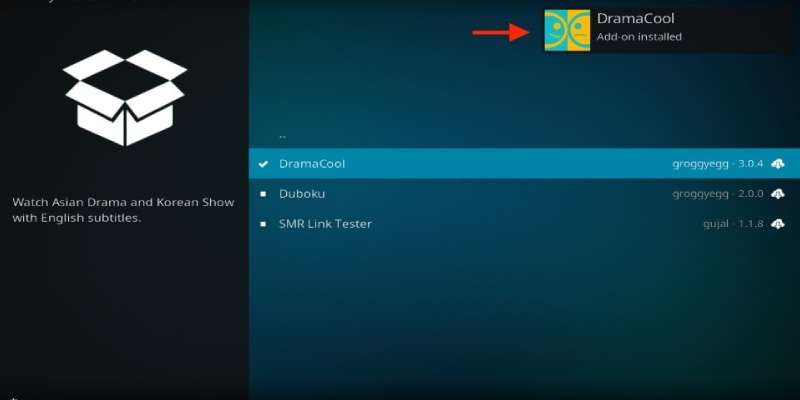
Drama Cool Kodi addon is a popular video addon that allows users to stream Asian dramas, movies, and TV shows. This addon provides a vast collection of Korean dramas, Japanese dramas, Chinese dramas, and other popular Asian content. It is a free addon and can be easily installed on Kodi.

If you are new to Kodi or not familiar with the process of installing addons, don’t worry. In this article, we will guide you through the process of installing Drama Cool Kodi addon step-by-step.

Before we begin, it is important to note that Kodi addons are not official content providers and may not be legal in your country. We recommend using a VPN (Virtual Private Network) service to protect your online privacy and hide your online activity from your ISP (Internet Service Provider).

Now let’s Get Started with the Installation Process.

Step 1: Open Kodi and click on the “Settings” icon on the top left corner of the screen.

Step 2: Select “System” from the options and then click on “Add-ons.”

Step 3: Turn on the “Unknown sources” option to allow the installation of third-party addons.

Step 4: Go back to the Kodi home screen and click on the “Settings” icon again.

Step 5: Click on “File Manager” and then select “Add source.”

Step 6: Enter the following URL in the “None” field: https://dramacool.video

Step 7: Name the media source “Drama Cool” and click on “OK.”

Step 8: Go back to the Kodi home screen and select “Add-ons” from the main menu.

Step 9: Click on the “Package Installer” icon on the top left corner of the screen.

Step 10: Select “Install from zip file” and then select the “Drama Cool” media source that we created in step 7.

Step 11: Click on the zip file named “repository.dramacool-x.x.x.zip” and wait for the installation to complete.

Step 12: After installation, click on “Install from the repository” and select the “Drama Cool Repository.”

Step 13: Click on “Video Add-ons” and then select “Drama Cool.”

Step 14: Click on the “Install” button to install the addon.

Step 15: Wait for the installation to complete and then return to the Kodi home screen.

Congratulations! You have successfully installed Drama Cool Kodi addon. You can now access the vast collection of Asian dramas, movies, and TV shows offered by this addon. To use the addon, simply click on “Add-ons” from the main menu, select “Video Add-ons,” and then click on “Drama Cool.”

Conclusion

Drama Cool Kodi addon is a free video addon that allows users to stream Asian dramas, movies, and TV shows. It is easy to install, but it is important to use a VPN to protect online privacy. Hope this article helps you in installing and knowing about the Drama Cool Kodi addon.

Prerequisites for Setting Up API Key on Kodi

Kodi is a free and open-source media player software application that allows users to access and stream a wide range of media content, including music, videos, and photos. One of the most powerful features of Kodi is its ability to interface with external services and applications, allowing users to access even more content.

API keys are an essential tool for any Kodi user who wants to interface with external services, as they allow the user to access restricted content and functionality. In this article, we will explore the prerequisites for setting up an API key on Kodi.

Understanding APIs

Before we dive into the specifics of setting up an API key on Kodi, it’s essential to have a basic understanding of what APIs are and how they work. An API, or application programming interface, is a set of protocols and tools used to build software applications. APIs allow applications to communicate with each other, share data, and access features and services that they wouldn’t be able to otherwise.

APIs are essential for any application that relies on external services or data sources, such as Kodi. Kodi uses APIs to interface with a wide range of services, including streaming services like Netflix, Hulu, and Amazon Prime Video, music services like Spotify and Pandora, and social media platforms like Facebook and Twitter.

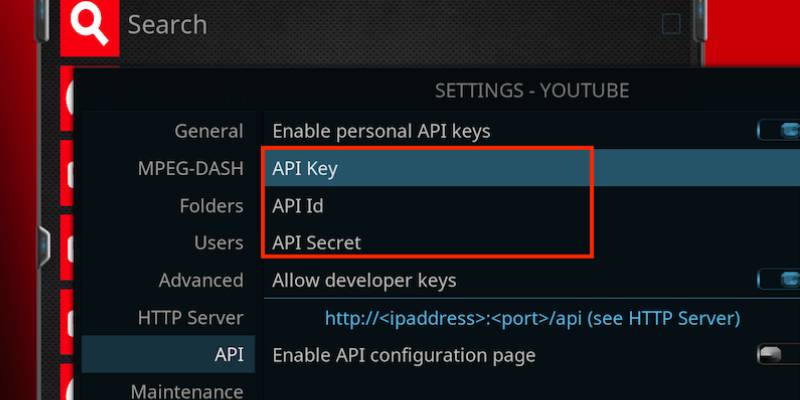
One example of setting up a personal API key on Kodi is YouTube. By setting up a personal API key for YouTube on Kodi, users can access additional features and content on the platform, such as their subscription feed and personalized recommendations. The process for setting up a personal API key for YouTube on Kodi follows the same prerequisites as outlined in the article. However, it’s important to note that each service may have its own API key requirements and guidelines, so it’s crucial to read the documentation carefully before proceeding with the setup.

Understanding the Role of API Keys

API keys are a critical component of API security. They are unique identifiers that are associated with a particular application or user and are used to authenticate API requests. API keys help to ensure that only authorized applications and users can access the API, preventing unauthorized access and misuse.

API keys are typically provided by the service provider, and they are required for any application or service that wants to interface with that API. Kodi users must obtain API keys for any external service that they want to use with Kodi, including streaming services, music services, and social media platforms.

Prerequisites for Setting Up API Keys on Kodi

Now that we have a basic understanding of APIs and API keys, let’s take a look at the prerequisites for setting up API keys on Kodi.

  1. Identify the Service Provider

The first step in setting up an API key on Kodi is to identify the service provider. Kodi interfaces with a wide range of external services, and each service may have its own API and API key requirements. It’s essential to identify the service provider before attempting to obtain an API key.

  1. Create an Account

Most service providers require users to create an account before they can obtain an API key. Users must provide some basic information, such as their name, email address, and password, to create an account.

  1. Locate the API Key

Once the user has created an account, they can locate the API key. The location of the API key will vary depending on the service provider, but it is typically found in the account settings or developer portal.

  1. Enter the API Key into Kodi

Once the user has obtained the API key, they must enter it into Kodi. To do this, they must navigate to the settings menu in Kodi and locate the interface settings. From there, they can select the service they want to use and enter the API key.

Conclusion

API keys are an essential tool for any Kodi user who wants to interface with external services and applications. By following these prerequisites for setting up an API key on Kodi, users can access a wide range of content and functionality, including streaming services, music services, and social media platforms. With the right API keys, Kodi users can customize their media experience and access the content they want, when they want it.

Building A Robust RPA Training Strategy for the Workforce

As businesses continue to digitize and automate their operations, the skill of Robotic Process Automation (RPA) is growing rapidly in demand. To keep up with the demanding RPA trends, organizations need to establish a robust training strategy that equips their workforce with the knowledge and skills necessary to design, develop, and maintain RPA systems. A comprehensive RPA training program can help companies maximize their return on investment, improve operational efficiency, and enhance the overall customer experience. In this article, we will explore the key components of a successful RPA training strategy and provide practical tips for developing and implementing such a program. When considering Robotic Process Automation (RPA), keep your workforce’s training and development requirements in mind. The key concerns for training and development requirements while using Robotic Process Automation (RPA) are:

Job security and job displacement: Employees may be concerned about their job security and the potential for job displacement due to automation.

Technical skills: Employees may need to develop new technical skills to operate and maintain RPA systems.

Change management: Employees may need support and guidance to adapt to changes in their work processes brought on by RPA implementation.

Employee resistance: Employees may resist the implementation of RPA due to a lack of understanding or fear of change.

Data privacy and security: Employees need to understand how to handle sensitive data and maintain the security of RPA systems.

Lack of technical knowledge: Employees may lack the technical knowledge required to implement and use RPA systems effectively.

Integration with existing systems: Employees need to understand how RPA systems integrate with existing systems and processes.

Time and resources: Employees may need time and resources to attend training sessions and develop new skills.

Measurement and evaluation: Employees need to understand how their performance will be measured and evaluated in the context of RPA implementation.

An effective RPA (Robotic Process Automation) training strategy should include the following elements:

Awareness and understanding of RPA: Ensure that all employees understand what RPA is and its benefits.

Business process analysis: Identify processes that can be automated and their impact on the workforce.

Technical skills development: Provide technical training on RPA tools and software to employees who will be involved in implementing RPA solutions.

Change management: Ensure that employees are prepared for changes in their work processes and are aware of how RPA will impact their role.

Ongoing support and development: Offer ongoing training and support to employees to keep their skills up-to-date and ensure the success of the RPA implementation.

Collaboration and communication: Encourage collaboration and communication between different departments and stakeholders to ensure that everyone is aligned on the RPA strategy.

Measurement and evaluation: Continuously measure and evaluate the effectiveness of the RPA training strategy and make necessary adjustments to ensure its success.

Build opportunities for employees to practice using RPA within a safe and supportive environment.

To build in opportunities for employees to practice using RPA within a safe and supportive environment, you can consider Providing hands-on training sessions where employees can practice using RPA tools and software in a controlled environment. Develop simulation exercises that mimic real-world RPA scenarios and allow employees to practice their skills. Encourage employees to work on test automation projects that are isolated from production systems, allowing them to gain experience in a safe environment. Create a mentorship program where employees can work with experienced RPA practitioners to gain hands-on experience. Provide opportunities for employees to work on real-world RPA projects and gain practical experience in a supportive environment. Offer regular feedback and support to employees to help them overcome challenges and refine their skills. Encourage employees to collaborate and share their experiences and best practices with one another, creating a supportive learning environment.

Conclusion

In conclusion, implementing RPA requires a robust training strategy that addresses the concerns and needs of the workforce. A successful RPA training strategy should include elements such as awareness and understanding of RPA, technical skills development, change management, ongoing support and development, collaboration and communication, and measurement and evaluation. It’s also important to provide opportunities for employees to practice using RPA in a safe and supportive environment through hands-on training, simulation exercises, test automation projects, mentorship programs, and real-world project involvement. By taking a comprehensive approach to RPA training, organizations can ensure that their workforce is well-prepared and equipped to successfully implement and use RPA systems.

It summarizes our thoughts on developing an RPA training strategy for your organization. Please contact us if you need assistance developing an RPA training plan or a bespoke RPA bot. Agile Managex Technologies provides RPA solutions in the UAE and throughout the world.

FuboTV: The Best Sports Streaming Service

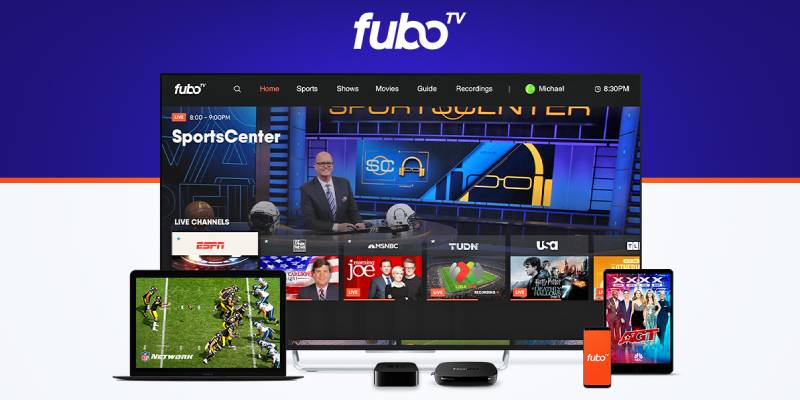
FuboTV is a sports-focused streaming service that offers live sports events, news, and highlights. It’s a paid subscription service that costs $59.99 per month. With FuboTV, you can watch live sports events from major leagues such as the NFL, NBA, NHL, and more. The site also provides access to live events from international soccer leagues such as La Liga, Serie A, and more.

Features of FuboTV

  1. Live Sports Coverage

One of the primary features of FuboTV is live sports coverage. With FuboTV, you can watch live sports events from major leagues such as the NFL, NBA, NHL, and more. The site also provides access to live events from international soccer leagues such as La Liga, Serie A, and more.

  1. News and Highlights

FuboTV provides access to news and highlights from various sports events. With FuboTV, you can keep up to date with the latest news, highlights, and scores from your favorite sports events.

  1. DVR Feature

FuboTV provides a DVR feature that allows you to record live events and watch them later. With this feature, you can watch your favorite sports events at your convenience, even if you miss the live broadcast.

  1. Multiple Device Support

FuboTV provides multiple device support, which means you can watch live events from various devices such as smartphones, tablets, laptops, and smart TVs. With multiple device support, you can watch your favorite sports events from anywhere, at any time.

  1. User-friendly Interface

FuboTV provides a user-friendly interface that makes it easy to find and watch live events. The site has a clean and straightforward layout that makes it easy to navigate and find the events you want to watch.

Benefits of FuboTV

  1. Access to Live Sports Events

One of the biggest benefits of FuboTV is access to live sports events. With FuboTV, you can watch live sports events from major leagues such as the NFL, NBA, NHL, and more. The site also provides access to live events from international soccer leagues such as La Liga, Serie A, and more.

  1. High-Quality Video

FuboTV provides high-quality video that provides a seamless viewing experience. With high-quality video, you can watch live events with clarity and detail.

  1. Affordable Subscription

FuboTV provides an affordable subscription that costs $59.99 per month. With an affordable subscription, you can watch live sports events without breaking the bank.

  1. Multiple Device Support

FuboTV provides multiple device support, which means you can watch live events from various devices such as smartphones, tablets, laptops, and smart TVs. With multiple device support, you can watch your favourite sports events from anywhere, at any time.

  1. User-friendly Interface

FuboTV provides a user-friendly interface that makes it easy to find and watch live events. The site has a clean and straightforward layout that makes it easy to navigate and find the events you want to watch.

Drawbacks of FuboTV

  1. Limited Channel Availability: FuboTV does not offer all the channels that traditional cable providers do, including some popular networks.
  2. High Cost: FuboTV’s packages can be more expensive than other streaming services and cable providers.
  3. Regional Availability: FuboTV is not available in all areas and may have limited local channels and sports coverage depending on location.
  4. Technical Issues: Some users have reported issues with the streaming quality, buffering, and video quality on the platform.
  5. Limited Cloud DVR Space: FuboTV’s cloud DVR space is limited, so users may have to manually delete recorded shows to make room for new ones

Summing Up

FuboTV is a sports-focused streaming service that offers live sports events, news, and highlights. It’s a paid subscription service that costs $59.99 per month. The site also provides access to live events from international soccer leagues such as La Liga, Serie A, and more. With FuboTV, you can watch live sports events from major leagues such as the NFL, NBA, NHL, and more. The high-quality video provides a seamless viewing experience for fans of live sporting events. The site has a user-friendly interface that makes it easy to find and watch live events.

The Best Vector Logo Designers Software 

Vector logo designers are software or online tools that allow users to create, edit, and export vector-based logos. Vector logos are made up of mathematical equations and can be scaled to any size without losing quality, making them ideal for use in branding and marketing materials. 

Vector logo design software can be a fun and engaging way to pass the time and alleviate boredom, as it allows users to be creative and experiment with different design elements to create unique logos. This software is typically packed with features and tools that can help users create a wide variety of logos, from simple text-based designs to more complex illustrations.

However, it’s important to note that vector logo design can be a technical process, it might require some learning and practice to master the software and create professional-looking logos. It’s not for everyone, so it’s best to try a few different software and see which one you enjoy working with the most.

If you’re new to vector design, it might take a while to understand the tools and features, but once you get the hang of it, it can be a fun and satisfying way to spend your time. There are also many tutorials and online resources available to help you learn how to use the software and improve your design skills.

In summary, vector logo design software can be a great way to kill boredom if you enjoy graphic design and want to create something new, but it’s not the only option, and it’s best to try different activities to see which one you enjoy the most.

Here are a few of the best vector logo designers:

Adobe Illustrator

Adobe Illustrator is a powerful vector graphics software that is widely used by professionals in the graphic design industry. It offers a wide range of tools and features for creating and editing vector graphics, including a variety of brushes, shapes, and text tools. It also has a wide range of export options, allowing you to save and export your logo in a variety of formats.

Inkscape

Inkscape is a free, open-source vector graphics software that is popular among both professionals and hobbyists. It has many of the same features as Adobe Illustrator, including a wide range of brushes and shapes, and it supports a variety of file formats. It also has a user-friendly interface and a large community of users who have created a wealth of tutorials and resources to help new users get started.

Canva

Canva is a web-based design tool that is widely used for creating a variety of design materials, including logos. It has a large library of pre-made templates and design elements, making it easy to create a logo without any design experience. It also offers a variety of export options, so you can easily save and share your logo.

Sketch

Sketch is a vector graphics editor and digital design tool for Mac. It’s widely used by UX and UI designers, and it’s known for its ease of use and efficient workflow. It offers a wide range of vector editing tools, allows collaboration with team members, and it has a large library of plugins and integrations.

CorelDRAW

CorelDRAW is a vector graphics editor that offers a wide range of tools for creating and editing vector graphics, including a variety of brushes, shapes, and text tools. It also has a user-friendly interface and a wide range of export options, so you can save and share your logo in a variety of formats.

These are just a few examples of vector logo designers, and there are many other options available on the market. It’s important to consider your specific needs and budget when choosing a vector logo designer and to research and read reviews of the different options before making a decision.

The Best Mac App for College Students

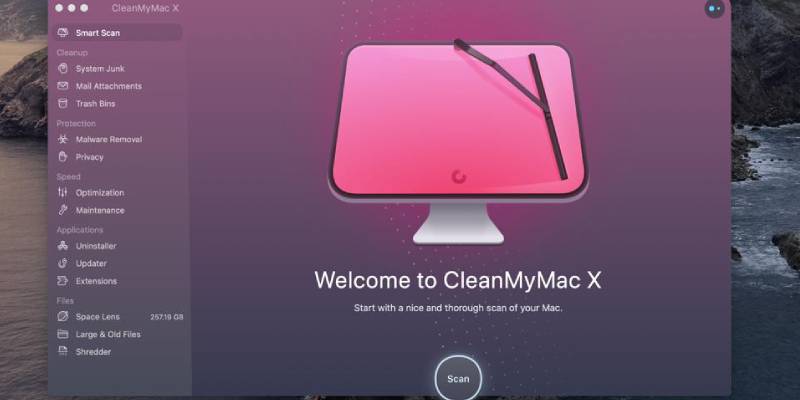
CleanMyMac X is a Mac cleaning and optimization tool that helps users keep their Macs running smoothly and efficiently. MacPaw, a software development company that specializes in Mac software develops it. CleanMyMac X can be a good app for college students as it can help them optimize and maintain their Macs efficiently.

One of the main benefits of CleanMyMac X for college students is that it can help them free up space on their hard drives. As college students often have limited storage on their laptops, CleanMyMac X’s ability to scan for and delete unnecessary files such as system junk, large and old files, and iTunes junk can help them keep their Macs running smoothly.

Additionally, CleanMyMac X’s maintenance feature can help college students keep their Macs running smoothly by repairing disk permissions, cleaning up system logs, and optimizing performance. This can help ensure that their Macs can handle the demands of college coursework, such as video editing and programming projects.

Additionally, the privacy protection feature can also be a great benefit to college students as they may have sensitive information on their computers and CleanMyMac X provides the ability to securely delete sensitive files and data.

However, it’s worth noting that CleanMyMac X is not the only app that can help college students optimize and maintain their Macs, other similar apps such as Onyx or MacKeeper are also available. Ultimately, it’s up to individual preferences and needs as to which app is best for them.

key Features of CleanMyMac X

Some of the key features of CleanMyMac X include:

  1. System Junk Cleanup: CleanMyMac X scans your Mac for system junk files, such as cache files, log files, and temporary files, and removes them to free up space on your hard drive.
  2. Large & Old Files Cleanup: CleanMyMac X scans your Mac for large and old files that you no longer need, and allows you to delete them to free up space on your hard drive.
  3. Mail Attachments Cleanup: CleanMyMac X scans your Mac’s Mail application for attachments that are taking up space on your hard drive, and allows you to delete them to free up space.
  4. iTunes Junk Cleanup: CleanMyMac X scans your iTunes library for files that are no longer needed, such as old backups, and allows you to delete them to free up space.
  5. Trash Bins Cleanup: CleanMyMac X scans your Mac’s trash bins for files that are taking up space and allows you to delete them to free up space.
  6. Privacy Protection: CleanMyMac X includes a privacy protection feature that allows you to securely delete sensitive files and data, making it impossible for others to recover them.
  7. Uninstaller: CleanMyMac X includes an Uninstaller feature that allows you to completely remove apps and their associated files from your Mac, freeing up space and improving performance.
  8. Maintenance: CleanMyMac X includes a maintenance feature that allows you to run various tasks, such as repairing disk permissions, cleaning up system logs, and optimizing your Mac’s performance.
  9. Smart Scan: CleanMyMac X includes a Smart Scan feature that automatically scans your Mac for system junk, large and old files, and other files that are taking up space on your hard drive, and allows you to delete them to free up space.
  10. Real-time protection: CleanMyMac X includes a real-time protection feature that automatically scans your Mac for system junk, large and old files, and other files that are taking up space on your hard drive, and allows you to delete them to free up space.

In summary, CleanMyMac X is a powerful and easy-to-use Mac cleaning and optimization tool that helps users keep their Macs running smoothly and efficiently. It includes a wide range of features that allow you to clean and optimize your Mac, free up space, and improve performance.

Summing Up

CleanMyMac X is a Mac cleaning and optimization tool that helps users keep their Macs running smoothly. College students can use it to scan for and delete unnecessary files such as system junk. The privacy protection feature can also be a great benefit to college students as they may have sensitive information on their computers. CleanMyMac X scans your Mac for system junk, such as cache files and logs files, and removes them to free up space on your hard drive. It’s not the only app that can help college students optimize and maintain their Macs, other similar apps such as Onyx or MacKeeper are also available.

Web App Creator: The Most Recommended App for your Phone

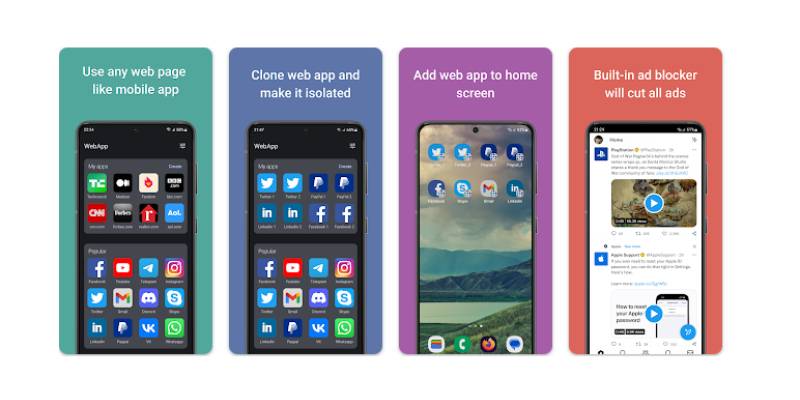
A web app creator is a tool or platform that allows users to create web applications without needing to have extensive knowledge of web development. It is one of the most recommended apps that you have on your phone. These types of tools typically provide a user-friendly interface and a set of pre-built templates or components that can be customized to create a functional web app.

There are different types of web app creators, some of which are tailored to specific types of apps, such as e-commerce or social networking apps, while others are more general and can be used to create a variety of different types of web apps. Many web app creators also offer hosting and other tools to help users launch and manage their web apps.

Some examples of web app creators include Wix, Shopify, Squarespace, Webflow, Bubble.io, and Appgyver, to name a few. It’s a good idea to check the features and pricing plan when you’re looking for the best web app creator for your needs.

Web app creators can be used for a wide range of purposes, from building websites and online stores to developing web-based applications and creating mobile apps. Some examples of web app creators include Wix, Shopify, Squarespace, Webflow, bubble.io, and Appgyver, to name a few.

It’s important to note that while web app creators can make it easy to create a web app, they may not be the best solution for all types of projects. Some web apps may require more advanced features and functionalities that are not available with web app creators. Additionally, web app creators may not be suitable for projects that require a high level of customization or the integration of specialized software. In such cases, it’s best to consult with a professional web developer or development team.

Web app creators can be used for a variety of purposes, depending on the specific tool and the needs of the user. Some common uses of web app creators include:

  1. Building websites: Many web app creators are designed to help users build and launch websites quickly and easily, without needing to have extensive knowledge of web development.
  2. Creating online stores: Some web app creators, such as Shopify and Bigcommerce, are specifically designed for creating e-commerce websites and online stores. These tools typically include features such as product management, inventory tracking, and secure checkout options.
  3. Developing web-based applications: Other web app creators, such as Appgyver, Bubble.io and Webflow, are geared towards developers and power users, and they allow to build more complex web-based applications, like SaaS platforms, booking systems, CRM etc.
  4. Creating landing pages: Landing pages are a single web page that users land on as a result of clicking a link on an email, webpage, or social media post. Some web app creators, such as Unbounce, are designed specifically to help create and manage landing pages.
  5. Creating mobile apps: Some web app creators can also be used to build mobile apps, which can then be published to app stores such as the Apple App Store and Google Play.

Web app creators can be a useful tool for businesses, entrepreneurs, and individuals who want to create and launch web apps quickly and easily, without needing to have extensive technical expertise.

Conclusion

A web app creator is a tool or platform that allows users to create web applications. These types of tools typically provide a user-friendly interface and a set of pre-built templates. Some examples of web app creators include Wix, Shopify, Squarespace, Webflow, Bubble.io, and Appgyver. Web app creators are tools that allow users to create and manage their own web apps. They can also be used to build mobile apps, which can then be published to app stores such as the Apple App Store and Google Play. Some tools are specifically designed for creating e-commerce websites and online stores.

iStudiez Pro: the Best App for Students

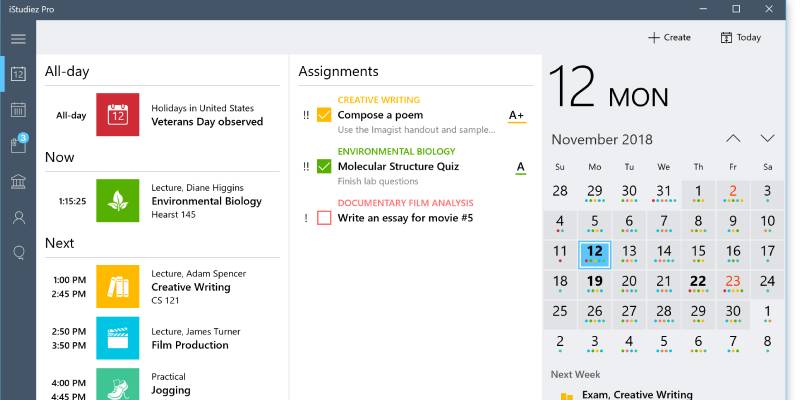
iStudiez Pro is a planner app that helps students manage their schedules, assignments, and grades. It is available for both iOS and macOS devices.

With iStudiez Pro, you can enter your class schedules, assignments, and exams, and the app will help you keep track of deadlines and due dates. You can also enter your grades and see how you are doing in each class. The app also includes features like a GPA calculator and notifications to help you stay on top of your studies.

iStudiez Pro is a popular student planner app that can be helpful for college students who want to organize their schedules and assignments. It allows you to input your class schedule, assignments, and exams, and then provides reminders for upcoming due dates and events. It also has a grade tracker feature that allows you to input your grades for each assignment and exam, so you can track your progress over the semester. Many college students have found it helpful for staying organized and on top of their workload.

To install iStudiez Pro, follow these steps:

  1. Open the App Store app on your iOS or macOS device.
  2. Tap the search icon in the bottom right corner of the screen (iOS) or in the top right corner of the screen (macOS).
  3. Type “iStudiez Pro” into the search field and press Enter.
  4. Tap the “Get” or “Buy” button next to the app, then follow the prompts to complete the purchase and install the app.

Alternatively, you can download iStudiez Pro from the App Store website using a computer and then sync it to your device using iTunes.

Once the app is installed, you can open it from the home screen of your device.

How to Use iStudiez Pro

To use iStudiez Pro, follow these steps:

  1. Open the app on your device.
  2. Tap the “Add Class” button to enter your class schedules. You can enter the class name, instructor’s name, location, and meeting times.
  3. Tap the “Add Assignment” button to enter your assignments and exams. You can enter the assignment name, due date, and class it is for.
  4. Tap the “Grades” tab to enter your grades for each class. You can enter your grades as you receive them throughout the term.
  5. Use the app to keep track of your assignments and deadlines. You can view your schedule and assignments by day, week, or month.
  6. Use the GPA calculator to see how you are doing in each class and overall.

iStudiez Pro also includes features like notifications to remind you of upcoming deadlines and the ability to export your data. You can customize these features and more in the app’s settings.

iStudiez Pro is a useful app for students who want to keep track of their schedules, assignments, and grades in one place. It can help students stay organized and on top of their studies, as well as track their progress over the term.

However, the app’s usefulness will depend on the individual student and their needs. Some students may find it helpful to manage their schedules and assignments, while others may prefer to use a different method for staying organized. It’s worth giving the app a try to see if it works for you.

Final Thoughts

iStudiez Pro is a popular student planner app that can be helpful for college students. It allows you to enter your class schedule, assignments, and exams and then provides reminders for upcoming due dates and events. The app also has a grade tracker feature so you can track your progress over the semester. iStudiez Pro is a useful app for students who want to keep track of their schedules, assignments, and grades in one place. It can help students stay organized and on top of their studies, as well as track their progress over the term. The app’s usefulness will depend on the individual student and their needs.

Design a site like this with WordPress.com
Get started